
Experiments on agent decision observability
Moving beyond traditional logs for AI observability

I’ve been using AI tools for programming for a little over a year at this point, starting out just building stuff to speed up workflows, transitioning to shipping production code with it, and lately using it to build my own projects. Through all of this, one of my biggest frustrations was with sheer agent and task management.
You either:
Babysit the tool for each command to make sure they’re all rational, or
Let it go wild, come back to it with no idea what it did and a massive diff.
Neither of these are great flows. This is on top of the massive context switching that sometimes comes with having many terminals or agents running in different codebases, all working on different features.
As far as I’ve seen, there’s been some steady progress with how #1 is handled. For example, Cursor 3 gives visibility into the status of each agent, and asks you for your input when needed.
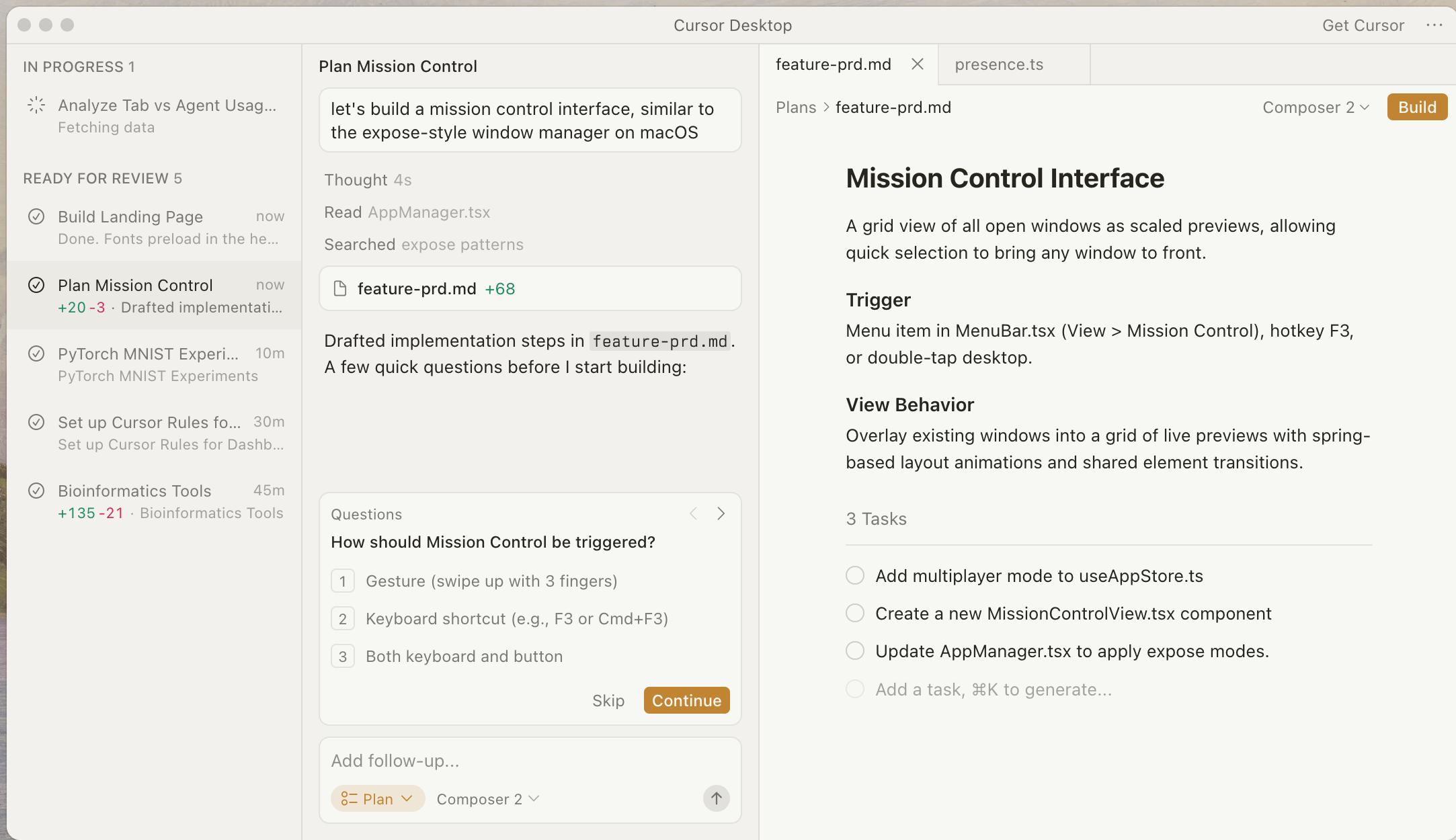
While there’s still some room to truly become the asynchronous management an engineer may envision for the future, it’s getting there. For #2, however, there’s a limited amount of progress, in my opinion, to what would genuinely be useful.
Claude Code CLI, Cursor, Cline, Codex, all of these tools use similar patterns to give visibility into the agent’s events. For enterprise AI agents, these are put into traces to get an event-by-event log of what an agent did.
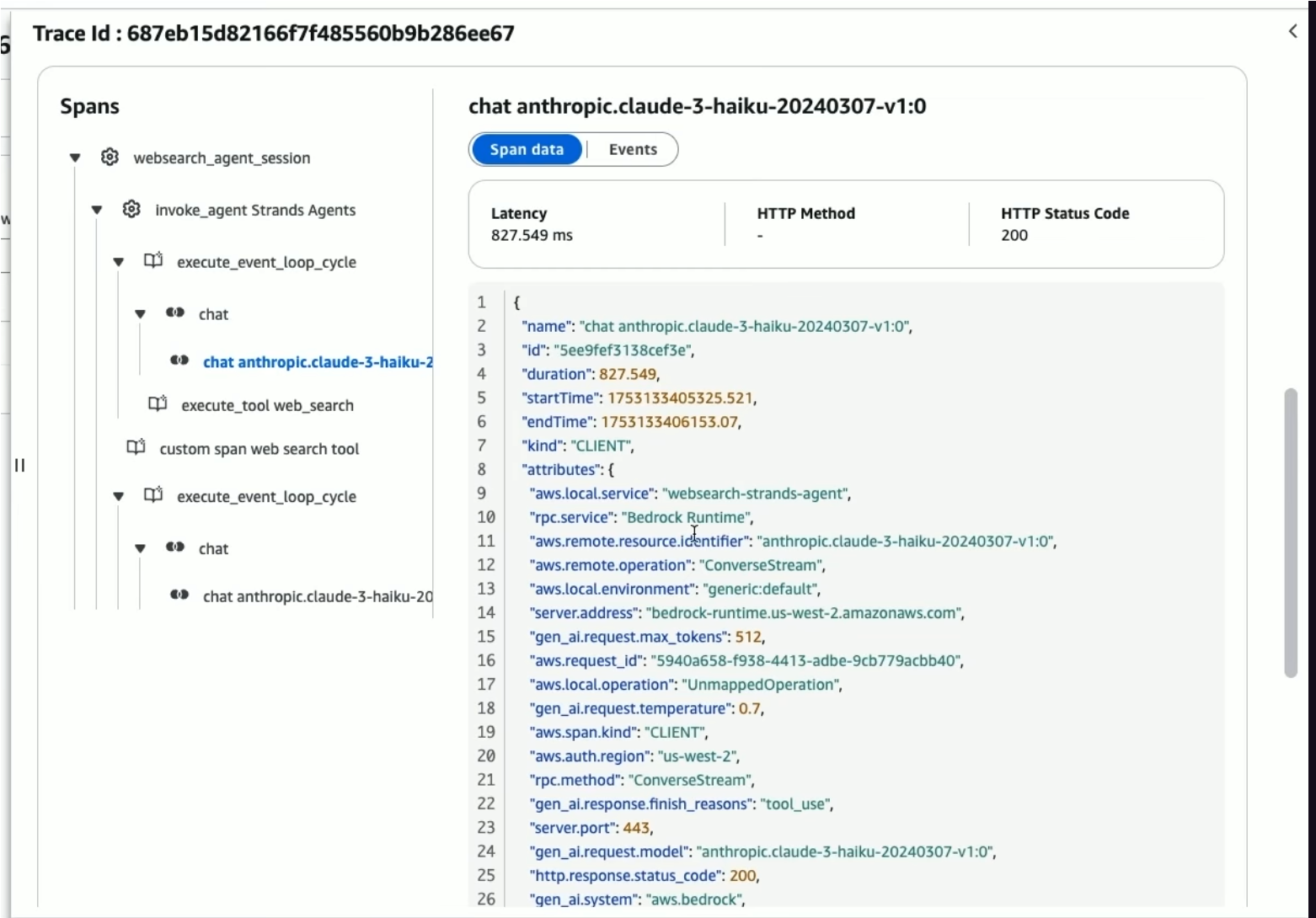
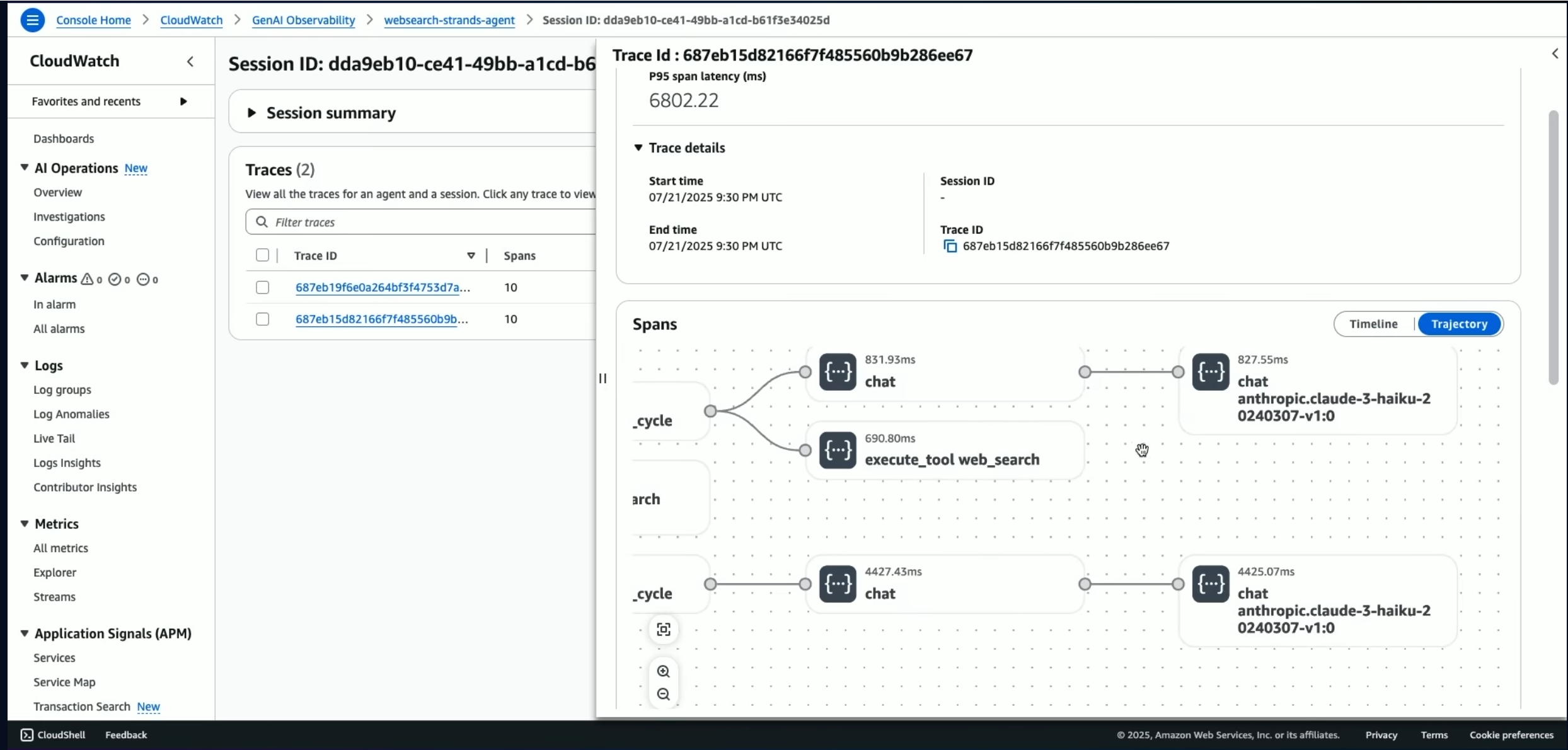
You can see the action it took at different steps, but you have no clue why it called a tool at a certain time, went with a specific direction in implementation, or added the tests it did. You can see that it created a new view in your frontend, but with long enough sessions, you may not know what it’s actually for, how it got to the conclusion it needed it, or even why it coded things the way it did.
The only pattern I’ve seen that addresses this in any way is the /btw command available in some CLI tools like Claude Code.

While not the intended use case, as far as I can tell (they say it’s for “a quick side question without adding to the conversation,” which I interpret as questions like “what does this API do” or “what is a LoRA”), it does allow you to ask why it made certain decisions and then fork the conversation to further iterate on it, if worth it.
If you just let your agent run, though, like I’m assuming a lot of people do, you end up at the bottom of like 1000+ assistant records without too much of a sense of how it got from A —> B, and so /btw has limited use here.
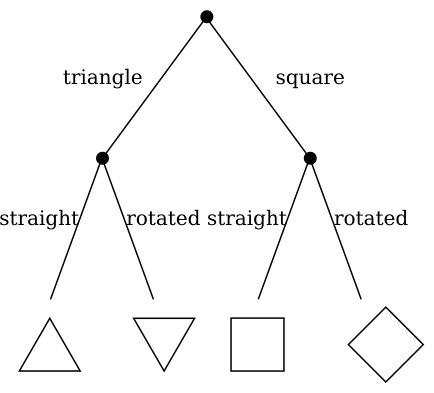
Of course, we also can’t just look into the model weights to figure out how the decision was made, since LLMs are notoriously black boxes. For something like a logistic regression or a decision tree, this becomes quite transparent: is it above or below a certain value? These offer very transparent ways of getting to a the same result, every time, also known as being deterministic. How do we do this for agents powered by LLMs?
From this discussion, we’ve largely come across two problems:
How do we simplify the information visible in longer logs so a user can look at it and figure out its path?
How do we understand why the agent made certain decisions?
Based on these problems, I looked to get an LLM to analyze its decisions and find a UX pattern that reduces the cognitive noise of browsing many events. Because I don’t have the infrastructure (or money) to train an LLM from scratch, I opted to go a simpler route: create a custom harness for my agent that prompts it to consider why it made decisions, and use it to build out a UI that shows these decision points.
Building the prototype
For this project, I used Claude Code to help me spec and write it. I used LM Studio with Qwen 3.5 9B locally to test the harness.
Given I had to prompt the model to explain its decisions, initially it didn’t want to explain that much. It would also run out of context fairly often if I didn’t open the context window wide enough or used a model that was too small.
In the end, though, I found a few UX patterns I liked to solve these problems:
Prompt agent every n events to look back and figure out if a decision was made. If yes, collapse the relevant records into a single decision.
Introduce a chat-per-record pane: a user can chat with each record in a log to ask more about it. The LLM gets all the records up to that point in the log so it has the context it needs, and nothing more.
Note that the UI components, patterns, states, etc. shown in the media below are a work in progress, so some pieces will likely be polished as the project progresses.
This includes an auto-collapsing records with a description of what happened, rather than fully showing each record inline as your session grows.
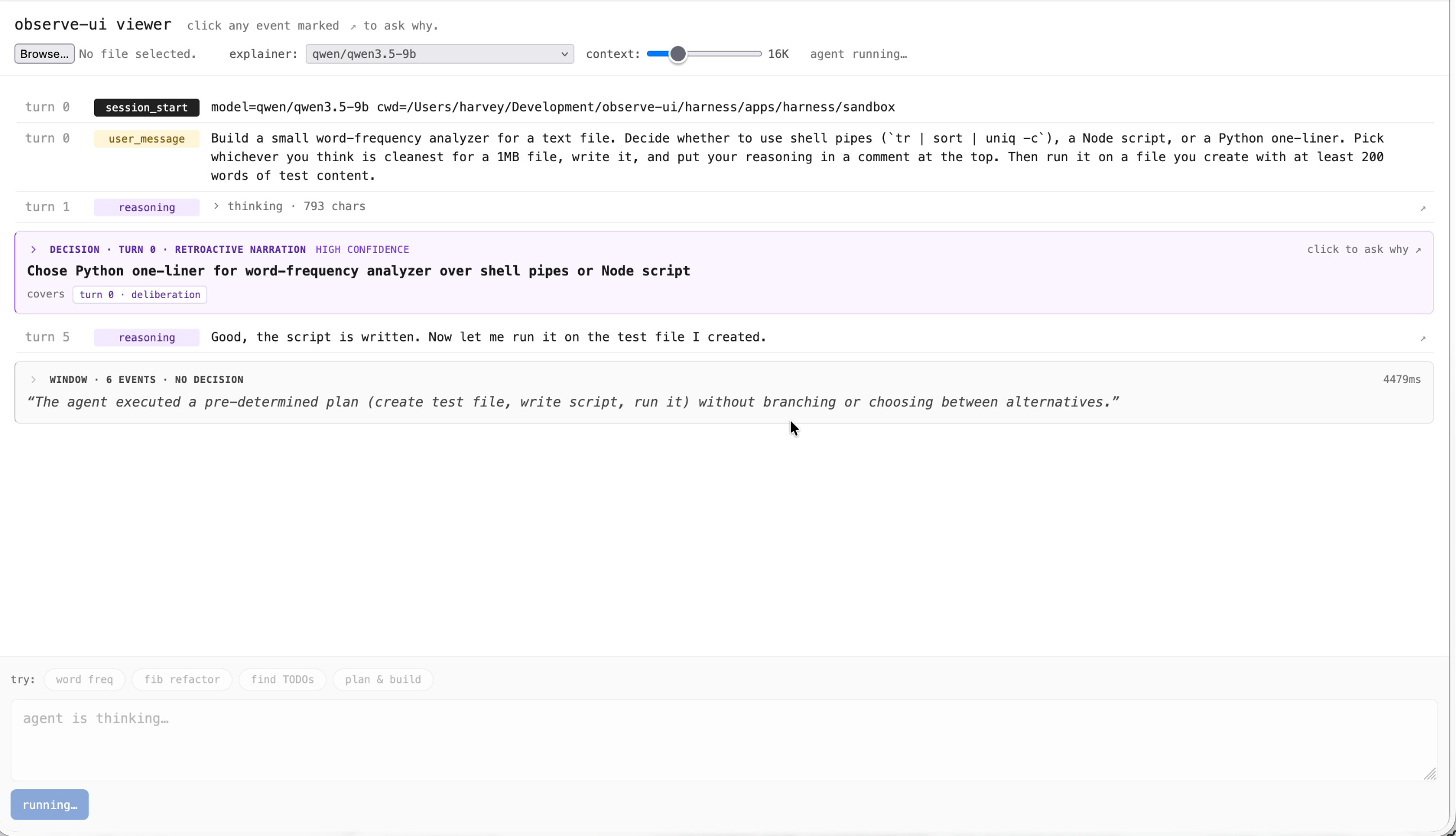
I generally like the patterns, as they allow for the better visibility into what happened through a conversation and the ability to expand if needed. Of course, though, this has its pitfalls:
I don’t know how well this pattern scales. I haven’t tested it with longer, 1,000+ record conversations, so that remains to be seen.
It requires extra LLM calls. For people wary of using extra inference, whether it be for environmental or credits reasons, this introduces an extra call every ~6 events. This also can make it slow down if latency is important.
If it turns out #1 is okay, then I think that makes it a viable solution, provided this decision visibility problem is something you actually get frustrated by.
Next steps
In terms of what I’m planning next, I have a couple of things I’m aiming to scale up: 1) using the pattern (and maybe UI library) within an actual app to showcase it, and 2) actually test it on some example large scale logs to see where the pattern still needs some refinement. Along with that, I have some expansions on the chat-per-record pane, particularly as it relates to exploration and iteration on your project.
Until next time,
Harvey
Almost has-been
P.S. If you’d like to follow progress on the project, its repo is available here.